πŸš€

We’re hiring β€” Join the PySTEM MiniBot Team!

Mission: Make robotics & STEM learning accessible for all. Build a pathway from zero β†’ your first robot β†’ FLL & FTC.

Why PySTEM MiniBot?

  • πŸ€– Assemble your own real robot – hands-on and fun
  • πŸ’» Learn Python coding for motors & sensors
  • ⚑ Explore electronics & engineering basics
  • πŸ† Gain skills for FLL & FTC competitions
  • πŸ’° Low cost & open source

Your Role: Help promote, test, and develop our PySTEM MiniBot. Gain real robotics experience, and boost your STEM portfolio for school and competitions.

Join our Discord → Let’s bridge the learning gap & support FIRST programs together!
πŸ€– PySTEM Mini Bot

Learn Programming Through Hands-On Robotics

PySTEM Mini Bot

Purpose

The PySTEM Mini Bot is designed to provide an accessible way for kids to learn programming while offering a low-cost alternative to expensive robotics kits like Lego SpikePrime and EV3.

πŸ’° Affordable Learning

Complete robotics education for roughly $60 - making programming accessible to everyone!

About the PySTEM Mini Bot

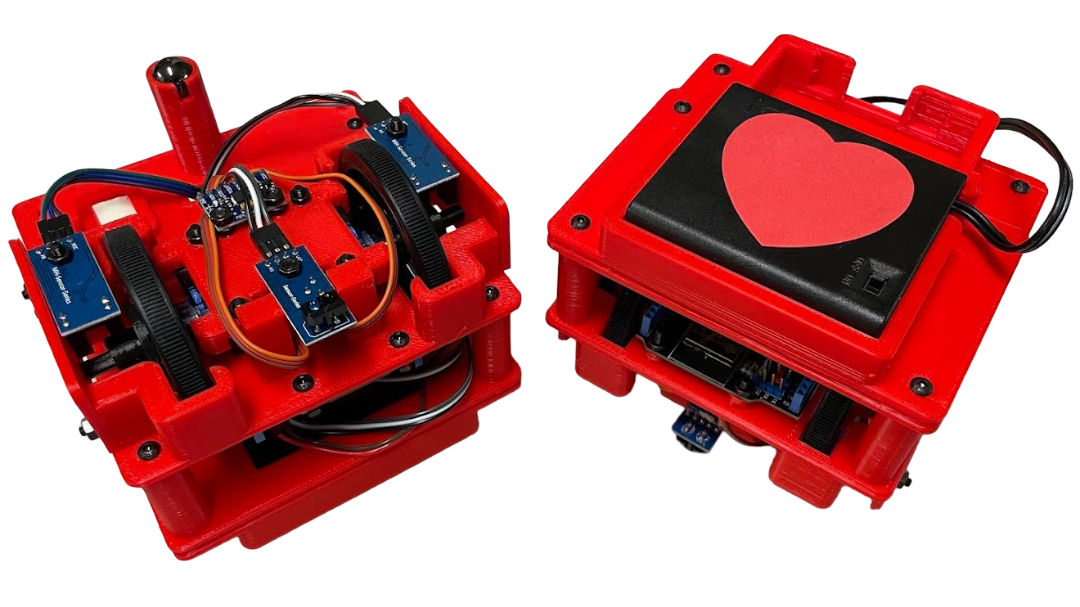
The PySTEM Mini Bot is a compact, child-friendly robot with a 3D-printed chassis, servo-driven wheels with encoders, a gyroscope, a line sensor and a distance sensor. It is programmed from the browser: write Python in the IDE, snap blocks together in Scratch, or train it to answer to your voice. No software to install.

Two brains are supported. The original build uses an ESP32 development board. The newer build uses an M5StickS3 on the Mini Bot HAT, which adds a colour LCD, a microphone for on-device speech recognition and Bluetooth, so you can program it without a cable.

The SDK follows the LEGO SPIKE Prime API, so what students learn here carries straight over to FLL and FTC robots. The same program runs unchanged in the browser simulator and on the real robot.

πŸ”§ Hardware

  • Two continuous micro-servo wheels with optical encoders
  • Gyroscope for straight driving and accurate turns
  • IR reflective sensor for line following and colour detection
  • Ultrasonic distance sensor for obstacle avoidance
  • Pan/tilt head for the distance sensor
  • ESP32 brain: Max V1 board over USB, or M5StickS3 + Bot HAT with LCD, microphone and Bluetooth
  • 3D-printed chassis, 4 Γ— AA battery pack

πŸ’» Programming Tools

  • Python IDE with autocomplete, file manager and serial monitor
  • Scratch block editor that generates the same Python
  • 3D simulator to test programs before touching the robot
  • Speech trainer to record your own voice commands
  • Connect over USB or Bluetooth, straight from the browser
  • Flash firmware and SDK with one page, no toolchain
  • Ready-to-run examples: motor control, line following, voice drive

🎯 What It Can Do

  • Precise movement: drive by centimetres, turn by degrees, encoders and gyro keep it honest
  • Line following: track a path and react to colours on the floor
  • Obstacle avoidance: measure distance, stop, look around, pick a way
  • Voice control: recognise your own command words on the robot, no internet needed
  • SPIKE Prime API: motor, motor_pair, color_sensor, distance_sensor, orientation
  • Sim to real: one program runs in the simulator and on the robot
Discord